tooling.cat_vc
// Distributed source tracking and overlay configurations
> Git CLI
Official WebsitePrimary Purpose
Distributed version control system.
Development Advantages
Provides scriptable automation endpoints. Enables custom pre-commit hooks to validate code formatting and run syntax checks before commits are pushed.
// Setup & Installation Guide
# Install Git on Ubuntu/Debian
sudo apt update && sudo apt install -y git

# Install Git on Windows utilizing Scoop
scoop install git

# Configure global developer settings
git config --global user.name "Eimen Mokchah"
git config --global user.email "eimen@mokchah.de"
git config --global core.autocrlf input
* Windows installation utilizes Scoop. See setup guide at scoop.sh.
// Git Command Cheat Sheet
Practical Integration & Usage Example (Git Aliases)
# Custom shortcuts for efficient repository analysis
git config --global alias.co checkout
git config --global alias.br branch
git config --global alias.ci commit
git config --global alias.st status

# Graphic history tree alignment
git config --global alias.lg "log --graph --abbrev-commit --decorate --format=format:'%C(bold blue)%h%C(reset) - %C(bold green)(%ar)%C(reset) %C(white)%s%C(reset) %C(dim white)- %an%C(reset)%C(bold yellow)%d%C(reset)' --all"
Quality Gate (Pre-Commit Hook)
#!/bin/bash
# Pre-commit hook for industrial static quality gate checking

echo "Running pre-commit hooks..."

# Check 1: Lint Python verification harness
if hash black 2>/dev/null; then
    black --check tests/
    if [ $? -ne 0 ]; then
        echo "Error: Python formatting checks failed (run 'black tests/')."
        exit 1
    fi
fi

# Check 2: Scan for committed secrets/keys
git diff --cached | grep -E "api_key|token|password"
if [ $? -eq 0 ]; then
    echo "Warning: Potential secrets detected in diff!"
    exit 1
fi

echo "All checks passed. Proceeding with commit."
> TortoiseGit
Official WebsitePrimary Purpose
Windows Explorer shell interface for Git.
Development Advantages
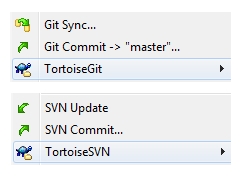
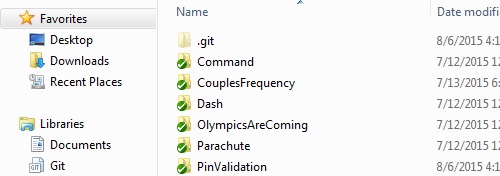
Shows file changes directly in explorer overlays. Simplifies visual context actions like diffs, logs, and staging via explorer context menus.
// Setup & Installation Guide
# Install TortoiseGit using Scoop package manager
scoop install tortoisegit

# Set up Git credential manager integration
git config --global credential.helper manager
* TortoiseGit requires Scoop. See setup guide at scoop.sh.
// Shell Context Integration Screenshots
> Sublime Merge
Official WebsitePrimary Purpose
Native Git client built for speed.
Development Advantages
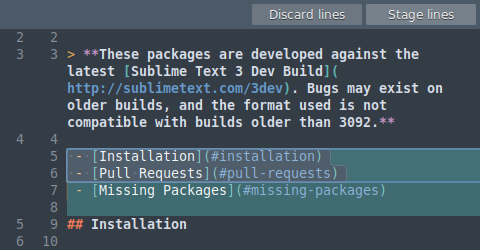
Processes commits, stashes, and large diffs instantly on monorepos. Highly detailed line-by-line stage/discard controls simplify commits.
// Setup & Installation Guide
# Install Sublime Merge on Ubuntu/Debian
wget -qO - https://download.sublimetext.com/sublimehq-pub.gpg | gpg --dearmor | sudo tee /etc/apt/trusted.gpg.d/sublimehq-archive.gpg > /dev/null
echo "deb https://download.sublimetext.com/ apt/stable/" | sudo tee /etc/apt/sources.list.d/sublime-text.list
sudo apt update && sudo apt install sublime-merge

# Or install on Windows via Scoop
scoop install sublime-merge
* Windows installation utilizes Scoop. See setup guide at scoop.sh.
// Sublime Merge Shortcuts
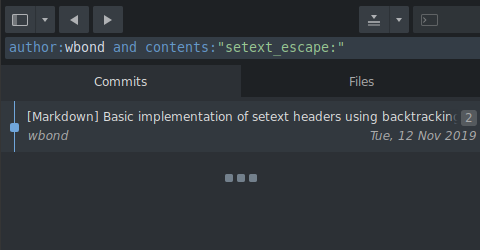
// Sublime Merge GUI Screenshots